

Submit your plugin for Marketplace review through a pull request to langgenius/dify-plugins.
What You Need#
- A working plugin project tested with the current Dify Community Edition or Dify Cloud.
- The Dify plugin CLI for packaging.
- Python 3 and
yqfor local validation. - A public source repository that reviewers and users can inspect.
The Marketplace accepts a packaged .difypkg, not your source tree. Reviewers still use the source repository declared in your metadata and PR to understand behavior that cannot be proven from the package alone.
Prepare the Package#
Include only files needed when the plugin runs: manifest.yaml, provider or tool definitions, source code, dependencies, README files, privacy policy, and assets.
Do not package development state such as .git/, virtual environments, caches, logs, .DS_Store, local settings, IDE files, or test artifacts. Never include .env files, access tokens, private keys, cloud credentials, or other secrets.
Confirm that manifest.yaml accurately declares the author, name, version, plugin type, runner, icon, source repository, contact information, and privacy policy.
The primary README.md must be in English and explain setup, usage, required APIs or credentials, connection requirements, and the source repository. Put translations under readme/README_<locale>.md.
Keep dependencies minimal and pinned closely enough to be reproducible. Avoid bare requirements, direct URL installs, and git-based installs unless the PR explains why they are required.
Python plugins must use dify-plugin >= 0.9.0. The validator also checks dependency metadata and queries the OSV database for known vulnerabilities.
Document Privacy and Network Access#
Your PRIVACY.md or hosted privacy policy must describe what user data the plugin collects, stores, logs, or sends to third parties. If the plugin collects no user data, say so explicitly.
When a plugin contacts external services, you can declare the expected domains in manifest.yaml:
Static analysis cannot discover every URL assembled at runtime or hidden inside a vendor SDK. Declaring domains makes those destinations visible even when the scanner cannot infer them from source code.
Classify the Risk#
Choose the highest level that matches the plugin. You will select exactly one level in the Marketplace PR template.
| Level | Use It When |
|---|---|
| Low | The plugin calls fixed, documented HTTPS APIs and does not execute user-controlled code, commands, SQL, file operations, browser automation, or arbitrary network requests. |
| Medium | The plugin processes uploaded files or user-provided URLs, performs write actions in a third-party service, sends user content externally, or handles personal data that is not highly sensitive. |
| High | The plugin can execute code or commands, run SQL, access databases or file systems, use SSH/SFTP, automate browsers, proxy or crawl arbitrary URLs, bundle executables, or handle sensitive personal data. |
If more than one level could apply, select the higher level. A lower label does not reduce review scope; it only creates inconsistent evidence and delays review.
For medium- and high-risk plugins, document the security boundary: how inputs are constrained, where data goes, which credentials are used, what timeouts apply, and how errors avoid exposing secrets.
Build and Validate Locally#
Package the plugin
From the directory above your plugin project, run:
The command creates a .difypkg archive. Inspect its filename and file size before continuing.
Clone the Marketplace Toolkit
Run package validation
To compare sensitive-capability findings with your planned PR disclosure, save the PR body to a file and add --pr-body-file /path/to/pr-body.md.
Resolve the report
Open validation-report/summary.md, then inspect the generated *.errors.txt and *.warnings.txt files.
Exit code 0 means no blocking package-level errors were found. Exit code 1 means a blocking finding or environment error must be resolved. Warnings do not fail validation, but reviewers may ask for clarification.
The local validator checks safe extraction, package contents and size, secret patterns, binaries, manifest and README metadata, dependency policy, Python compilation and safety patterns, outbound domains, dependency vulnerabilities, financial-activity signals, and optional sensitive-capability disclosure.
Only the vulnerability lookup reaches the network. Add --offline when necessary; the report will list dependencies without claiming that they are vulnerability-free.
Choose the Submission Type#
Create a package directory under your author namespace:
The package metadata, source repository, contact information, README, privacy policy, and risk disclosure must all describe the same plugin.
Increment version in manifest.yaml, rebuild the package, and add the new .difypkg to the existing plugin directory.
An update PR should normally add only the new package file. Keep old published packages unless a maintainer explicitly asks otherwise. Summarize fixes, features, migrations, and breaking changes in What changed so the release pipeline can extract useful release notes.
Open the PR#
Fork and synchronize the repository
Fork langgenius/dify-plugins, then clone your fork and keep its main branch synchronized with upstream.
Create a focused branch
Confirm that the branch changes exactly one .difypkg package:
Commit and push
Create the pull request
Open a PR from your fork to langgenius/dify-plugins:main. Keep the PR out of draft only when the package and description are ready for automated and human review.
Submit one .difypkg per PR. Combining plugins or versions prevents CI from identifying a single package path and blocks the submission.
Complete the Submission Template#
The current template is part of the review contract. Do not delete fields or replace it with a short free-form description.
Plugin information
Provide the author, plugin name, version, public source repository, and a monitored contact channel. These values must agree with manifest.yaml and the package documentation.
Submission type and changes
Select New plugin or Version update, then explain what the plugin does or what changed in this version. Write release-note-quality details for updates, including migrations and breaking changes.
Risk level
Select exactly one of Low risk, Medium risk, or High risk. The repository applies a matching risk:* label. Selecting none or multiple levels produces risk: missing and a bot comment.
Required checks
Confirm package hygiene, testing, README quality, privacy coverage, and English localization only after verifying each item. If a requirement has a limitation, explain it in Reviewer notes instead of silently checking the box.
Security and privacy notes
List command or code execution, SQL, SSH/SFTP, browser automation, file operations, arbitrary URL fetching, proxying, and sensitive-data handling. Write None only when none apply.
Local validation and reviewer notes
Paste the validator command and result. Add known limitations, package or binary exceptions, migration notes, and context reviewers need to interpret warnings.
Help Reviewers Verify Your Plugin#
| Do | Avoid |
|---|---|
| Use English for the PR title, body, and primary README. | Mixing untranslated CJK text into the primary submission fields. |
| Link the exact public source repository for the package. | Linking an organization homepage or unrelated monorepo root without directions. |
| Explain why sensitive behavior is necessary and constrained. | Describing a high-risk capability as low risk because it is optional. |
| Include concrete validation commands and results. | Saying “tested” without environment or result details. |
| Keep package bytes and disclosure in sync. | Copying an old PR body for a changed version. |
Handle PR Checks and Review #
Opening the PR, pushing commits, or marking a draft ready for review starts the automated checks. Use the result to decide whether you need to act.
| Result | What You Do |
|---|---|
| Pass | Wait for maintainer review. A passing check does not guarantee approval. |
| Blocking error | Fix the package or PR, rebuild when needed, and update the same PR. Do not open a replacement PR. |
| Warning | Review the finding. Fix an actual problem, or add context when the behavior is intentional. A warning alone does not fail the check, but a reviewer may request changes. |
| Changes requested | Update the source, rebuild the package when needed, push the correction to the same PR, and respond to the reviewer. |
After approval and merge, the repository validates the package again and uploads it to the production Marketplace. You do not need to start CI or upload the approved package yourself.
Review Plugin Performance and Feedback in Creator Center #
After your plugin appears in Marketplace, view its performance data on the Plugin page in Creator Center. Review individual ratings, likes, and feedback messages in Inbox.
Review Your Published Plugins#
Under your personal account, connect the GitHub account used to publish your plugins. If you have connected multiple accounts, select the account whose plugins you want to view.
Each plugin card shows its downloads, overall rating, rating count, and likes.
Review Plugin Performance and Feedback With Your Team#
Select the organization your team uses. Any plugins listed there are visible to all organization members.
When creating a new organization for plugins, find the Plugin ID on the plugin’s Marketplace details page. Enter the part before / in Unique handle. For example, if the Plugin ID is team-name/plugin-name, enter team-name.
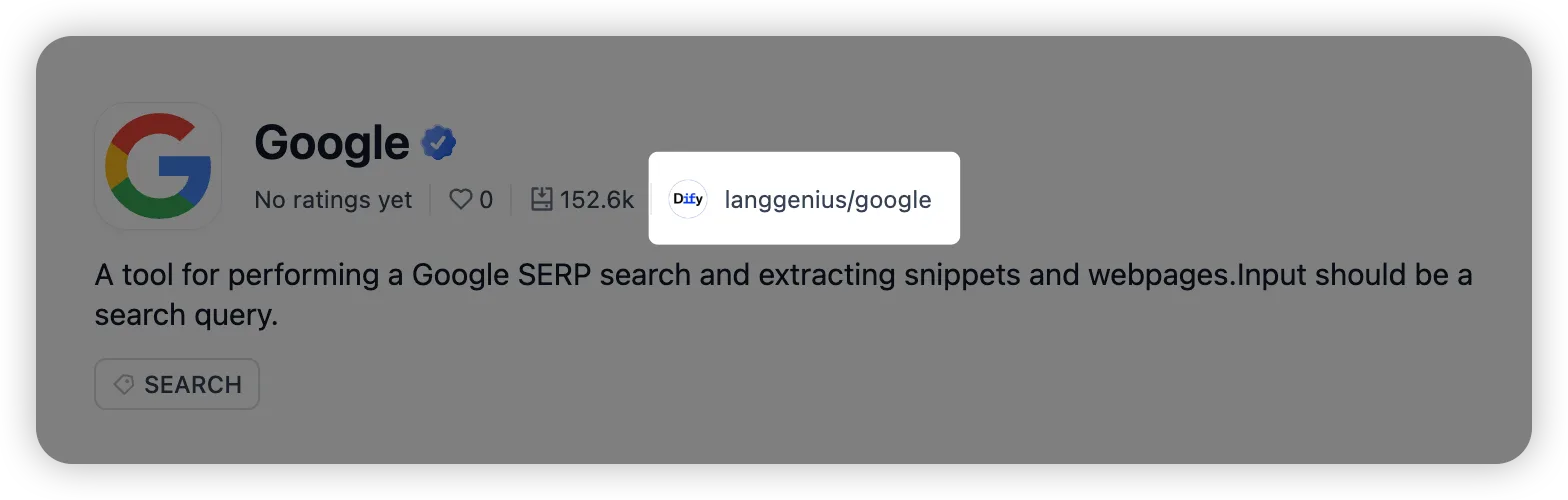
Once the organization is verified as the publisher, its published plugins appear on the Plugin page. Invite teammates to view the same plugins without connecting their own GitHub accounts.
Claim Missing Organization Plugins#
If a plugin published under your organization’s name does not appear on the organization’s Plugin page, open Claim plugin to request access to its performance data and feedback.
- Under your personal account, select Claim plugin.
- For each plugin, copy its Plugin ID from its Marketplace details page and pair it with the PR that originally published it.
- Confirm your contact email and describe your role in maintaining the plugins. If a different GitHub account opened the PRs, explain why.
- Select Submit claim.
Track the request in Claim history. After approval, you can view all plugins from the claimed publisher. If the claim is rejected, review the reason and select New Claim to update the evidence and resubmit it.